Overview
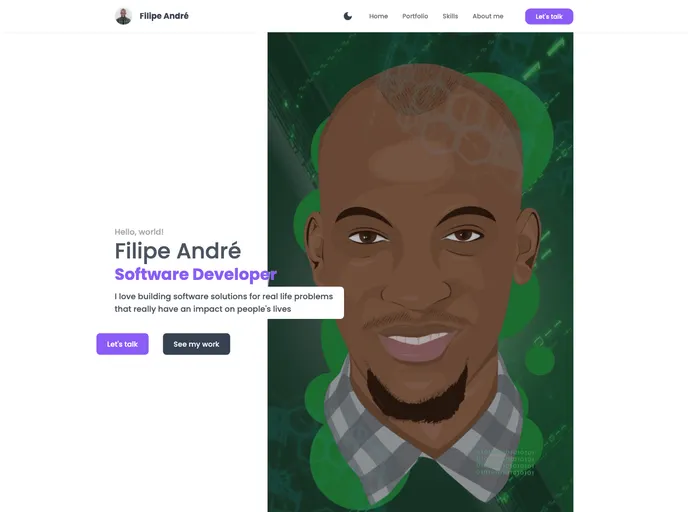
The My Portfolio website template is a free and customizable portfolio template built using NextJS and Tailwindcss. It integrates with DatoCMS for data management and is designed to be user-friendly for developers looking to showcase their work. The template is already being used as a portfolio by the creator and can be easily customized to fit individual needs.
Features
- NextJS and Tailwindcss: Built using the NextJS framework and styled with Tailwindcss for efficient development and responsive design.
- DatoCMS Integration: The template seamlessly integrates with DatoCMS, allowing users to manage and update their portfolio data easily.
- Graphql & Graphql-request: The template utilizes Graphql and Graphql-request for efficient data fetching and manipulation.
- TypeScript: Built with TypeScript, providing strong typing and improved developer experience.
- Easy Setup: The template can be easily set up by forking the repository, configuring the required environment variables, and building the necessary models in the DatoCMS dashboard.
- Development Server: Run the development server to make changes and see the immediate impact on the web app.
- Deployment with Vercel: The template can be easily deployed using the Vercel platform, offering a hassle-free deployment process.
- Next.js Resources: The template provides links to the Next.js documentation and interactive tutorial for users looking to learn more about Next.js.
Installation
To set up the My Portfolio template:
- Fork the repository into your GitHub account.
- Clone the forked repository to your local development environment.
- Install any required dependencies using a package manager like npm or yarn.
- Create a
.env.local file and add the necessary environment variables, including the DatoCMS read-only API token. - Build the required models in the DatoCMS dashboard based on the types provided in the
src/@types/index.d.ts file. - Run the development server and open
http://localhost:3000 in your browser to see the template in action. - Make any desired changes to customize the template according to your needs.
- Deploy the template using the Vercel platform for easy and efficient deployment.
Summary
The My Portfolio template is a free, customizable, and user-friendly website template for developers to showcase their work. Built with NextJS, Tailwindcss, and integrated with DatoCMS, the template offers a seamless and efficient solution for managing and updating portfolio data. Its easy setup process, development server, and deployment with Vercel make it an ideal choice for developers looking to create a professional and visually appealing portfolio website.