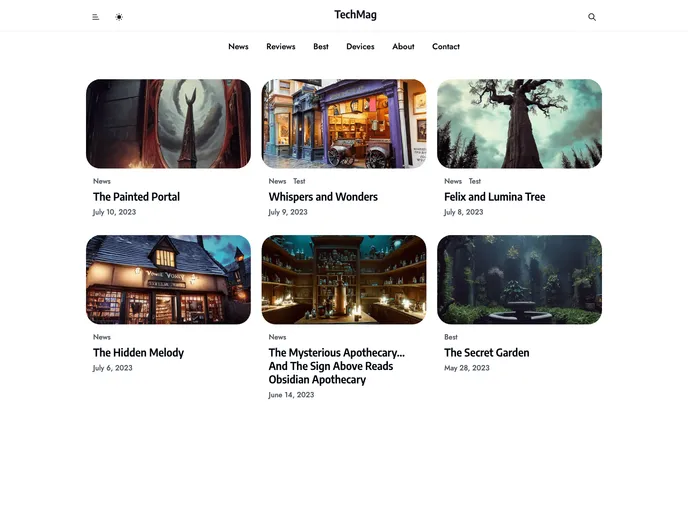
Nextjs Tech Magazine Template screenshot

Nextjs Tech Magazine Template

Author Avatar Theme by Abhinishere
Updated: 9 Nov 2023
23 Stars

Clean, modern Next.js template for magazines, news and blogs.

Overview:

This is a Next.js project created with create-next-app. The project is a development server that can be accessed on http://localhost:3000. The page can be edited by modifying the app/page.tsx file and it will auto-update as changes are made. The project uses next/font to optimize and load the Inter font from Google Fonts. The Next.js documentation, a Next.js tutorial, and the Next.js GitHub repository are available for more information. The project can be deployed on the Vercel Platform using the Next.js deployment documentation.

Features:

  • Next.js project created with create-next-app
  • Development server available on http://localhost:3000
  • Auto-updates the page as changes are made
  • Uses next/font to optimize and load the Inter font from Google Fonts
  • Resources available for learning Next.js, including documentation, tutorials, and GitHub repository
  • Deployable on the Vercel Platform

Installation:

To install the Next.js project, follow these steps:

  1. Create a new Next.js project using create-next-app.
  2. Run the development server by executing the command: npm run dev.
  3. Open your browser and access http://localhost:3000 to see the project result.
  4. Modify the app/page.tsx file to edit the page content. The page will automatically update as you make changes.
  5. Use the next/font package to optimize and load the Inter font from Google Fonts.
  6. For more information on Next.js features and API, refer to the Next.js Documentation.
  7. Learn Next.js through an interactive tutorial available on the Learn Next.js resource.
  8. Contribute to the Next.js project by checking out its GitHub repository.
  9. To deploy the Next.js app, use the Vercel Platform. Refer to the Next.js deployment documentation for more details.

Summary:

This Next.js project is created with create-next-app, providing a development server for building web applications. It is easy to set up, with a simple installation process. The project includes features like auto-updates, next/font integration for font optimization, and integration with the Vercel Platform for easy deployment. Additionally, there are resources available for learning Next.js, including documentation, tutorials, and a GitHub repository for contributions.